Installation is done as for every portable application, extract downloaded archive into folder on your hard drive and run "fjoiner.exe"
when you want to start File Joiner. File Joiner is portable which means you can run this app even from your floppy disk,
CD/DVD-ROM drive, USB flash drive, etc.
Program is packed in rar archive which can be unpacked by using:
By proceeding to download or install File Joiner, you are deemed to agree to be bound by the terms of this
License.
How to use File Joiner?
How to join .001 files with File Joiner
What keyboard shortcuts are there in File Joiner?
Key(s)
Action
+/-
move items in the list, up/down
B
browse for location
J
join
S
sort
Ctrl + A
select all items in the list
Del
delete selected items in the list
Shift + Del
delete all items in the list
Ctrl + T
toggle always on top
Options
Always on top
Always on top is a feature that allows File Joiner window to stay on top of all other windows even when it does not have focus. Useful when
dragging files from Windows Explorer to File Joiner.
Associate with .001 files (not portable)
Integrates into Windows Explorer so you can open files with extension .001 by just double-clicking a file. And if you have setup auto loading
parts, File Joiner will also load all other parts at the same time.
Disable hash
This option disables calculation of CRC32 and MD5 hash values and hides hash fields on File Joiner window. Calculating hash slows down joining
process significantly so you should disable hash if you don't need it.
Remove all items from list after join
This option removes all items from the list after successful join.
Settings
Test for missing parts on load
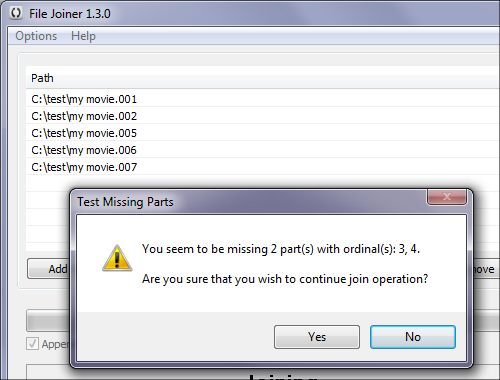
Purpose of this "test" is to see if any part is missing and warn user about it. It's very important to have all parts
present because otherwise you will end up with the broken output file.
File Joiner: Missing parts warning
NOTE: This test is only triggered if the first file in the list has extension .001
Test parts size consistency on load
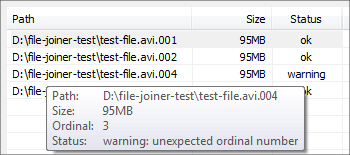
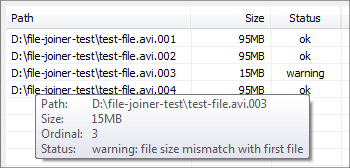
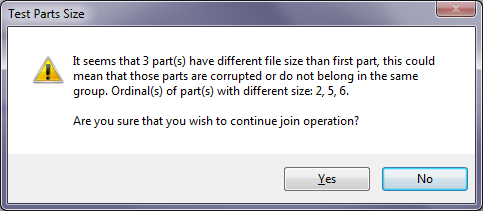
This test validates two things, first that all parts except last one have exactly the same file size and that last part has smaller file
size than all other parts. Both of those cases usually mean that some parts are corrupted, but, that is not necessarily always the case and
you should use your judgment to decide if you wish to continue with join operation.
File Joiner: Parts have different sizes warning
NOTE: This test is only triggered if first file in the list has extension .001
Test for missing parts
Same test as "Test for missing parts on load", only difference is that this test is done upon starting Join operation.
File Joiner: Missing parts warning
Test parts size consistency
Same test as "Test parts size consistency on load", only difference is that this test is done upon starting Join operation.
File Joiner: Parts have different sizes warning
Remember window position
Opens File Joiner in the screen position it was when you turned it of.
Use Recycle Bin when deleting parts
File Joiner will delete all parts to Recycle Bin instead of just deleting them directly. This is used when you select option "Delete parts
when done" at the bottom of File Joiner window.
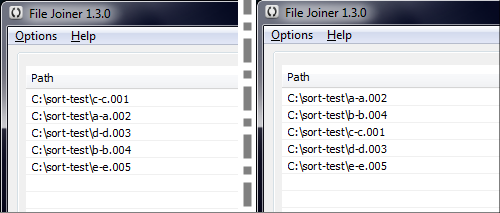
Sort by using only last number in file path (faster)
Number sorting extracts only last number from file paths and then sorts files in the list by using those extracted numbers. For example,
first file in the list is "aa.002" and next one is "bb.001", number sorting will use 001 and 002 to sort this two files and disregard the
fact that first file starts with letter "a" and second file starts with "b". Number sorting is the old behavior of File Joiner's sorting
and because it is faster it is the preferred way of sorting when dealing with .001 files.
File Joiner Sort: Number sorting on the left side, full path sorting on the right side
Now you can turn off option "Sort by using only last number in file path" in Options menu to use full path sorting which is useful if
you are not using File Joiner to join .001 files. By taking the same example from above full path sort would firstly sort by letter "a",
then letter "b". See example on the image above.
Remove all items from list after join
This option removes all items from the list after successful join.
Disable auto load parts
Disables auto loading of parts.
Recurse sub-folders
The recurse sub-folders option specifies that all sub-folders of the specified folder path should be used when adding files. This is used
only when using "Add Folder" function.
Default output path
Enables you to choose the default output path.
Append to first file in the list (for advanced users only)
Appends all parts to the first part in the list, much faster because first part doesn't need to be copied. However, you have to be careful that your
files are ordered correctly in the list, if you make a mistake with the file order there is no undo to revert what you have done and you just messed up
first file in the list.
Auto load parts
Auto loading of file parts is done ONLY if the list is currently empty and if you open or drag and drop one file with extension
.001
Multilanguage support
To select different language, from File Joiner main window go to Language menu and pick a language
from the list. File Joiner language is instantly changed to newly selected language.
Thanks to many contributors, File Joiner is available in various languages, list of all supported
languages is located on main File Joiner page.
If you want to translate File Joiner into your language, please go to
translations page for further instructions.
FAQ
Can File Joiner combine video or audio files?
File Joiner is NOT a video or audio editor! File Joiner is generic utility for joining split files, it does not understand file types.
To join standalone video files you will need a video editor.
Why is File Joiner connecting to the internet?
File Joiner has an automatic update checker since version 2.2, update checker runs on app startup. In case you are not
comfortable with File Joiner connecting to the internet, you can disable "Check for new version on startup" option.